Install and start Tricentis Mobile Agent on Windows
Tricentis Mobile Agent runs on Windows, Mac, and Linux. Before you can test your mobile applications, you need to install and start Tricentis Mobile Agent.
To install Tricentis Mobile Agent on Windows, follow these steps:
-
Download Tricentis Mobile Agent from the Tricentis Support Hub.
-
Open the downloaded file and follow the instructions of the install wizard.
-
Start Tricentis Mobile Agent, using the Tricentis Mobile Agent desktop shortcut or search for it in the Windows search bar.
-
Check the Agent's status by right-clicking the Tricentis icon in the systems tray.
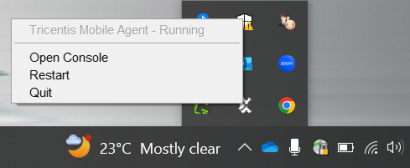
Status information
If you want to silently install Tricentis Mobile Agent without any user interface, follow these steps:
-
Open Command Prompt and navigate to the folder that contains the installer.
-
Enter the following command to begin silent installation:
Tricentis Mobile Agent [enter the version#].exe /S -
Optionally, you can adjust the command to specify a custom installation folder:
Tricentis Mobile Agent [enter the version#].exe /S /D=[enter the installation path]What's next
Now that you've installed and started Tricentis Mobile Agent, connect and prepare your devices to start using Tricentis Mobile Agent.