Use Agentic Test Automation for Salesforce
In addition to manually adding or recording steps, you can create tests for Salesforce with the help of Agentic Test Automation. With this tool, you can work with a specially-trained AI Agent to generate and run unique tests for your Salesforce environment.
Prerequisites:
-
Download and install the Testim Extension - Why do you need Testim extension?
-
Connect your Salesforce test environment to Testim/TTA for Salesforce.
Creating a new Salesforce test with Agentic Test Automation
→To create a new test:
-
From anywhere in your Testim for Salesforce account, select Agentic Test Automation at the top of the screen.
-
If this is the first time you're using this service, scroll to the bottom of the Terms of Service and select Got it to opt in.
-
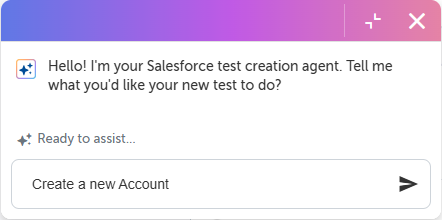
Now, you can start prompting the agent. Give the agent a description of what you want to test, whether that's simple or complicated. Take a look at how to create prompts for some examples of how you can do this.
-
As the agent works, it will occasionally ask for confirmation to add test steps. Review the information it gives you, and confirm whether or not to add the step.
-
When the agent is finished creating the test, it will ask you if you want it to run the test. At this point, you can stop and manually review, edit, and run the test as you normally would. Or, you can confirm this request and have the agent run the test.
-
If the agent runs the test, it will validate the test and resolve any issues it finds. After the test run is complete, the agent provides a summary of the test it created, which you can add to the test as an artifact.
How to create prompts
You can give the agent simple, high-level prompts, or you can create prompts that are more detailed with customizations for your organization. The more detail you give, the better the agent can tailor your test, but simple prompts cost fewer token To learn more about what your prompts can look like, check out the table below for some example prompts:
|
Use Case |
Prompt |
Complexity |
|---|---|---|
|
Test account management |
Create a new Account. |
Low |
|
Test account management with custom credentials |
Create an account with the following data: Account name: Account123, Parent account: Account123_Root UAN: 111, Do not delete the account Account 123. |
Medium |
|
Test account and contact management |
Create a new Account and add a new Contact for that Account. |
Low |
|
Test opportunity management |
Create an Account and an Opportunity, progress the Opportunity through all stages. |
Medium |
|
Test activity management, but do not validate the test |
Create a new Lead and log a Call and set a Task for 7 days time, do not validate either task. |
Medium |
| Test lead conversion and validate the test | Create a new Lead, work through all stages to converting to an Opportunity with a new Account and Contact. Validate that a new Opportunity, Account and Contact are created, and the fields are correct from the Lead. | High |