Configure the default JVM heap size for Elasticsearch
By default, Elasticsearch automatically sets the JVM heap size based on a node's roles and total memory. Using the default sizing is recommended for most production environments. However, if needed, you can override the default heap size by configuring the minimum and maximum heap size settings.
Following are the instructions for setting the Elasticsearch JVM heap size, based on operating system.
For additional details on configuring the default JVM heap size for Elasticsearch, refer to the Elasticsearch documentation.
Linux
The following instructions indicate how to edit the default JVM options and limit memory allocation for Linux.
Process
## Create JVM Options file in the /etc/elasticsearch/jvm.options.d/ folder
cat > /etc/elasticsearch/jvm.options.d/jvm-heap.options << EOL
-Xms4g
-Xmx4g
EOL
## Restart Elasticsearch
systemctl restart elasticsearch
## Verify new heap size
grep 'heap size' /var/log/elasticsearch/elasticsearch.logFollowing is an example of how the JVM Options file should look after the configuration is complete and Elasticsearch has been restarted.
[root@vinxlpsoes01 jvm.options.d]# pwd
/etc/elasticsearch/jvm.options.d
[root@vinxlpsoes01 jvm.options.d]# cat > /etc/elasticsearch/jvm.options.d/heap.options << EOL
> -Xms2g
> -Xmx2g
> EOL
[root@vinxlpsoes01 jvm.options.d]# cat jvm.options
-Xms4g
-Xmx4g
[root@vinxlpsoes01 jvm.options.d]# grep 'heap size' /var/log/elasticsearch/elasticsearch.log
[2021-06-07T08:01:11,904][INFO ][o.e.e.NodeEnvironment ] [vinxlpsoes01] heap size [4gb], compressed ordinary object pointers [true]Windows
The following instructions indicate what to edit in the Elasticsearch file for Windows.
Process
## Install Elasticsearch as a Windows Service
[Drive:]\Path\to\Elasticsearch\bin> elasticsearch-service.bat install
## Open Elasticsearch Service Manager
[Drive:]\Path\to\Elasticsearch\bin> elasticsearch-service.bat manager
PS E:\Elasticsearch\elasticsearch-7.13.1\bin> .\elasticsearch-service.bat install
Installing service : "elasticsearch-service-x64"
Using ES_JAVA_HOME (64-bit): "E:\Elasticsearch\elasticsearch-7.13.1\jdk"
-Des.networkaddress.cache.ttl=60;-Des.networkaddress.cache.negative.ttl=10;-XX:+AlwaysPreTouch;-Xss1m;-Djava.awt.headless=true;-Dfile.encoding=UTF-8;-Djna.nosys=true;-XX:-OmitStackTraceInFastThrow;-XX:+ShowCodeDetailsInExceptionMessages;-Dio.netty.noUnsafe=true;-Dio.netty.noKeySetOptimization=true;-Dio.netty.recycler.maxCapacityPerThread=0;-Dio.netty.allocator.numDirectArenas=0;-Dlog4j.shutdownHookEnabled=false;-Dlog4j2.disable.jmx=true;-Djava.locale.providers=SPI,COMPAT;--add-opens=java.base/java.io=ALL-UNNAMED;-XX:+UseG1GC;-Djava.io.tmpdir=C:\Users\ADMINI~1\AppData\Local\Temp\2\elasticsearch;-XX:+HeapDumpOnOutOfMemoryError;-XX:HeapDumpPath=data;-XX:ErrorFile=logs/hs_err_pid%p.log;-Xlog:gc*,gc+age=trace,safepoint:file=logs/gc.log:utctime,pid,tags:filecount=32,filesize=64m;-Xms8191m;-Xmx8191m;-XX:MaxDirectMemorySize=4294967296;-XX:InitiatingHeapOccupancyPercent=30;-XX:G1ReservePercent=25
PS E:\Elasticsearch\elasticsearch-7.13.1\bin> .\elasticsearch-service.bat managerAfter executing the "elasticsearch-service.bat manager" command from the command line, the Elasticsearch Service Manager window appears. You can then edit the JVM heap size on the Java tab of this window.
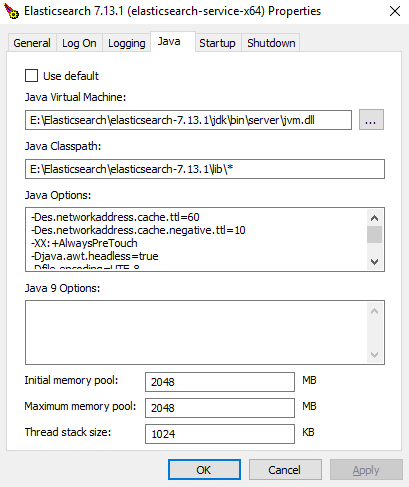
After making changes on the Elasticsearch Service Manager window, install and run the Elasticsearch Service Manager or view the application logging to confirm the change.
Example
PS E:\Elasticsearch\elasticsearch-7.13.1\bin> .\elasticsearch-service.bat install
Installing service : "elasticsearch-service-x64"
Using ES_JAVA_HOME (64-bit): "E:\Elasticsearch\elasticsearch-7.13.1\jdk"
-Des.networkaddress.cache.ttl=60;-Des.networkaddress.cache.negative.ttl=10;-XX:+AlwaysPreTouch;-Xss1m;-Djava.awt.headless=true;-Dfile.encoding=UTF-8;-Djna.nosys=true;-XX:-OmitStackTraceInFastThrow;-XX:+ShowCodeDetailsInExceptionMessages;-Dio.netty.noUnsafe=true;-Dio.netty.noKeySetOptimization=true;-Dio.netty.recycler.maxCapacityPerThread=0;-Dio.netty.allocator.numDirectArenas=0;-Dlog4j.shutdownHookEnabled=false;-Dlog4j2.disable.jmx=true;-Djava.locale.providers=SPI,COMPAT;--add-opens=java.base/java.io=ALL-UNNAMED;-XX:+UseG1GC;-Djava.io.tmpdir=C:\Users\ADMINI~1\AppData\Local\Temp\2\elasticsearch;-XX:+HeapDumpOnOutOfMemoryError;-XX:HeapDumpPath=data;-XX:ErrorFile=logs/hs_err_pid%p.log;-Xlog:gc*,gc+age=trace,safepoint:file=logs/gc.log:utctime,pid,tags:filecount=32,filesize=64m;-Xms8191m;-Xmx8191m;-XX:MaxDirectMemorySize=4294967296;-XX:InitiatingHeapOccupancyPercent=30;-XX:G1ReservePercent=25
PS E:\Elasticsearch\elasticsearch-7.13.1\bin> .\elasticsearch-service.bat manager