Insights 2025.8 Release Notes
November 2026
With the 2025.8 Insights release, we're working to make Insights faster and easier to navigate, so you can quickly get the data you're looking for.
Faster reporting
We added a new beta report to our selection of faster Explore Data reports. Now, you can find the Defects and Requirements beta reports, in addition to the existing Test Cases and Test Runs beta reports. You can find beta reports under Explore Data > Beta Reports. Note that, while these reports should contain exactly the same information as the original reports, they may behave unexpectedly because they are in a beta stage.
If you need to access the original version of any report, it will still be available in its original location in the Explore Data dropdown.
Learn how to use Explore Data to create custom reports.
Simplified navigation
We've updated the Insights homepage to help you find what you're looking for, faster.
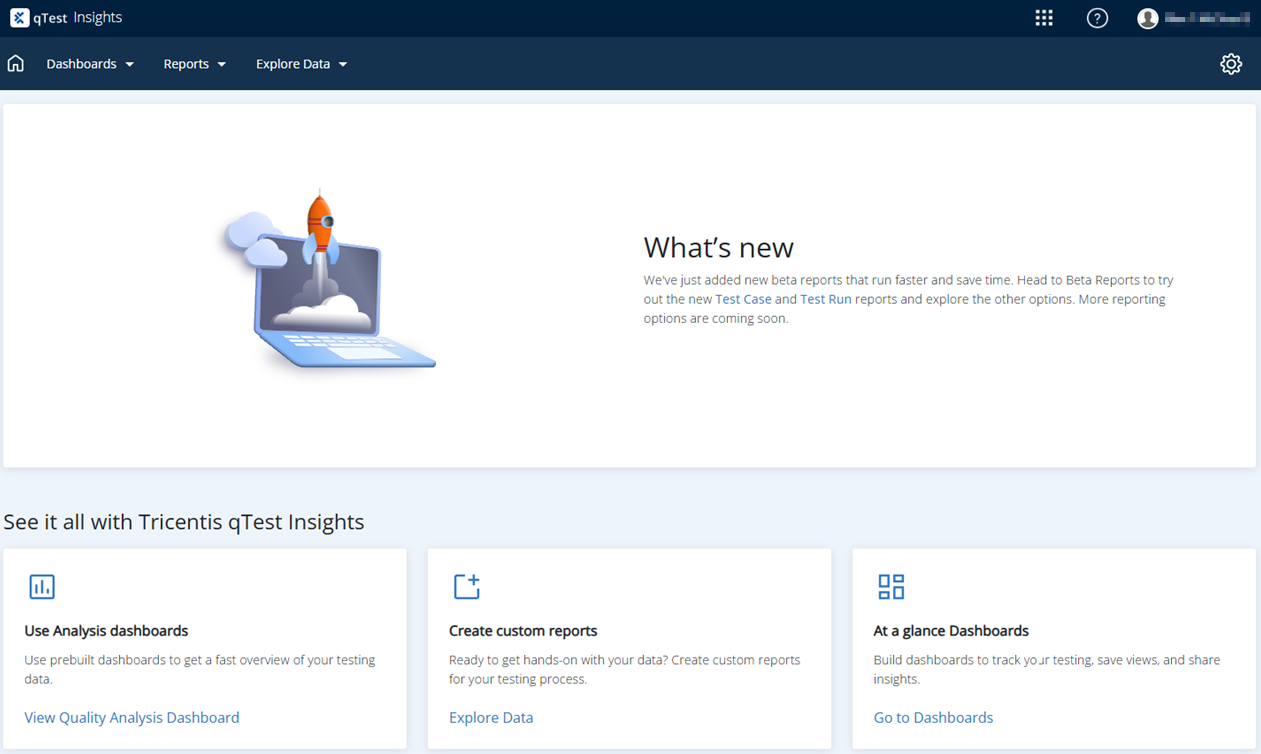
Find what you need fast with three simplified options.
You can find all your usual functions in the reorganized tabs:
-
Dashboards: Use our standard analysis dashboards or create and manage custom dashboards.
-
Reports: Navigate our canned reports or manage your custom reports.
-
Explore Data: Create custom reports from your raw Insights data.
We've also moved settings to the  gear menu, to align with our other satellite applications.
Learn more about our new Insights layout.
Background changes
ETL service deprecation
We're deprecating the legacy ETL system and migrating all functions to a new optimized service to improve rapid-dashboard scheduling, baseline performance, security, and long-term maintenance.
Migration to iETL may take Please note that migration to the iETL may take some time, depending on the amount of data and computing power you have. We highly suggest monitoring your database load and temporarily adding resources as needed during pre-calculation. We also recommend performing this deployment on Friday after working hours to ensure iETL has enough time to complete the initial computing.
Security updates
We made background changes to improve the overall security of qTest Manager.
Deprecated Insights Embed Script function
We've deprecated the Insights Embed Script function. To learn more about this, please take a look at our End of Support announcement.
Bug fixes
| Ticket # | Component | Description |
|---|---|---|
|
CS0453031 |
qTest - Insights |
Fixed an issue where the Latest Execution End Date parameter had the wrong format in the SQL filter. |
|
CS0448275, CS0448323 |
qTest - Insights |
Fixed an issue where custom site fields caused slow loading in Test Cycles filters. |
|
CS0444027 |
qTest - Insights |
Fixed an issue where users could view defects from projects they did not have access to. |
|
CS0425389, CS0447306, CS0447306 |
qTest - Insights |
Fixed an issue that caused large tables to overlap and cover visual charts from Explore Datacharts in emailed PDF reports. |
| CS0446227, CS0448275, CS0448323 | qTest - Insights | Optimized performance by updating how custom fields are managed. |
|
CS0413762, CS0447930, CS0450301 |
qTest - Insights |
Fixed an issue that caused the Coverage and Quality reports to export all data, instead of only the selected data. |
| CS0438514, CS0440876, CS0444288, CS0447477, CS0451999 , CS0449824 | qTest - Insights | Fixed an issue that caused Defect Analysis reports to contain duplicate records. |
| CS0451735, CS0458592 | qTest - Insights | Fixed an issue that caused scheduled reports to contain improper data formatting in PDFs. |
| N/A | qTest - Insights | Fixed an issue that caused an incorrect count of executed test runs in the Velocity report. |
| N/A | qTest - Insights | Fixed an issue that caused the Velocity analysis report to export as an empty Excel file. |
| N/A | qTest - Insights | Renamed the Test Planned vs Executed chart in Insights to Cumulative Test Execution vs Planned to better reflect the data displayed. |
| CS0462465 | qTest - Insights | Fixed an issue that caused Planned vs Executed Report Settings to return an error when the user saved. |
| CS0433279, CS0436350, CS0435440, CS0391772, CS0454546 | qTest - Insights | Fixed an issue where Insights did not recognize Tosca test cases as automated test cases. |