Invite collaborators to use NeoLoad Web
As an Account Admin, you can invite collaborators to use NeoLoad Web as:
-
Guests: they will be allowed to view and analyze test results only.
-
Testers: they will be allowed to send data to NeoLoad Web and to delete test results.
For more information, see the Users view.
To invite new users to NeoLoad Web and assign them a role, follow these steps:
-
In the left navigation panel, click the Users
 icon.
icon. -
In the Users view, click the ADD button.
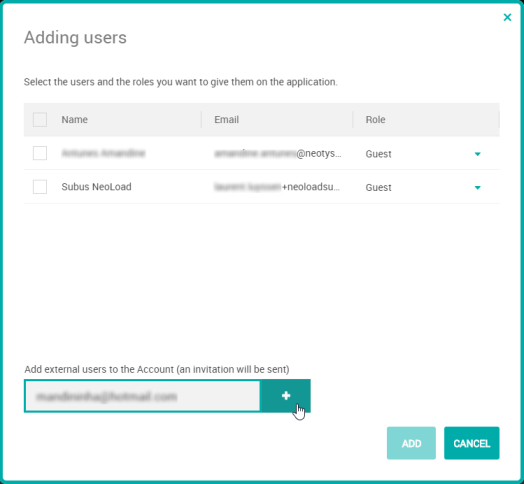
The Adding users screen pops up.
The upper part of the screen lists the existing Neotys Account members who have no role assigned on NeoLoad Web.
-
In the bottom part of the screen, enter the email address of the user(s) you want to grant access to NeoLoad Web.
-
Pay attention to the error message that can appear in red. Scroll the mouse over the exclamation point to read it.
-
Click the + button so that the user receives an invitation at the email address provided. This also selects the user in the upper part of the screen.
-
In the upper part of the screen, use the Role drop-down list of the user to select a role.
-
Click the ADD button to confirm your setting.