Install the NeoLoad Module for CA APM
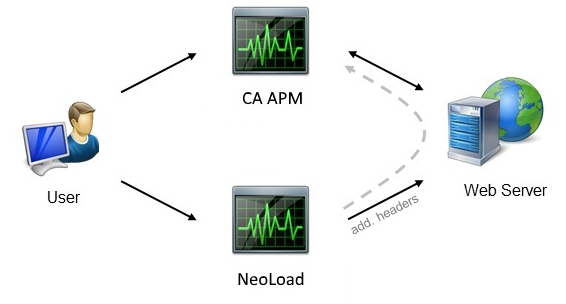
The NeoLoad module for CA APM allows sending information during the test to the CA APM component, and accessing CA APM Workstation through NeoLoad.
To enable the NeoLoad/CA APM integration, it is necessary to:
-
install an additional component in the CA APM agent of the monitored application
-
enable the CA APM support in NeoLoad
When the function is enabled, the NeoLoad module for CA APM sends HTTP headers with information about Virtual Users and transactions to CA APM. This makes it easier to analyze the root causes of slow or failed transactions which occur during load tests with CA APM which segregates web page response times and other performance metrics using the information provided by NeoLoad.
In the CA APM Java agent
To use the NeoLoad module for CA APM, it is necessary to install the Synthetic User Field Pack Extension in the CA APM Java agent for Java applications.
Then the detection of synthetic transactions must be configured as described
When following the procedure to configure the detection of synthetic transactions, the values of the keys mentioned below must be specified as follows: introscope.agent.synthetic.node.name=Synthetic_Transactionintroscope.agent.synthetic.user.name=SyntheticID
To install the Synthetic User Field Pack extension in the Java agents, follow theses steps:
-
Install a CA APM (Introscope) Java agent (version 7.x or above) on the server hosting the application to be monitored.
-
Configure the detection of synthetic transactions as explained above.
In the CA APM .NET Agent
To use the NeoLoad module for CA APM, it is necessary to install the Synthetic User Field Pack Extension in the CA APM agent.
Then the detection of synthetic transactions must be configured as described
When following the procedure to configure the detection of synthetic transactions, the values of the keys mentioned below must be specified as follows: introscope.agent.synthetic.node.name=Synthetic_Transaction introscope.agent.synthetic.user.name=SyntheticID
To install the Synthetic User Field Pack extension in the .NET agents, follow theses steps:
-
Install a CA APM (Introscope) .NET agent (version 7.2.2.0 or above) on the server hosting the application to be monitored.
-
Configure the detection of synthetic transactions as explained above.