VUH only
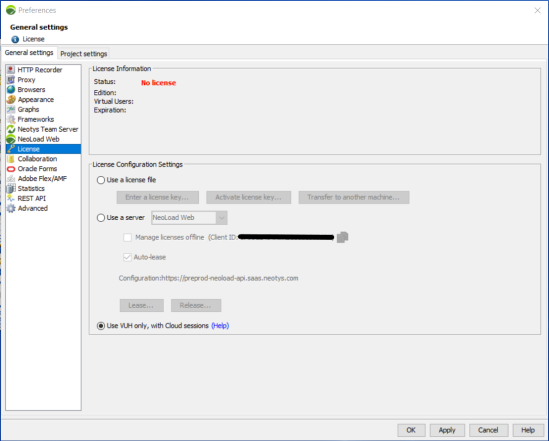
Use Virtual User Hours (VUH) on their own to run Cloud tests with the NeoLoad Cloud Platform when you don't want to use a license. You select Using VUH only, with Cloud sessions in the License General settings.
When you use VUH only:
-
NeoLoad can run Cloud tests only.
-
NeoLoad starts a Cloud session that you can use for several tests.
-
The Cloud session is billed by the full hour. Any started hour counts as a full hour.
-
VUH cover the full number of Virtual Users your test requires. You can't combine VUH with license VUs in this mode.
You can't run tests that use RealBrowser with the Using VUH only, with Cloud Sessions option.
If you want to run Cloud tests with a license instead, combine your license with Cloud credits. For more information, see Test from the Cloud.
Use VUH only
To use VUH only, follow these steps:
-
In NeoLoad, select Help > License management.
-
Select License.
-
Select Use VUH only, with Cloud sessions.
-
Select OK.