Map WebSocket messages
This tutorial describes how to configure WebSocket messages mapping. For more information about WebSocket, see WebSocket requests.
Understand the context
WebSocket is a Web technology providing full-duplex communication channels over a single TCP connection. It enables an asynchronous communication from client to server. Unlike HTTP protocol where each client request is followed by a server response, WebSocket client and server can send single non-blocking messages without waiting for any answer from the other peer.
Since communication between client and server does not follow the request/response pattern, designing a scenario based on WebSocket technology is different than designing for plain HTTP protocol. There is no response linked to a request, therefore we have the following constraint, we cannot:
-
measure a response time on a business transaction
-
block the script execution on a request
-
specify a variable extraction on a response for a specific request
Some applications use a proprietary protocol over WebSocket that is compliant with the request/response matching pattern.
NeoLoad handles WebSocket
The way NeoLoad can map the WebSocket request and response is to define how to extract a mapping ID from the WebSocket channel response and specify the mapping ID on each WebSocket request. During the recording, NeoLoad will associate requests and responses when the mapping IDs are equal.
Having a communication based on the request/response pattern eases the usage of variable extractor/injection workflow and provides response times for business transactions.
Example
The example below illustrates a drawing editor allowing to create shapes. A shape is identified by a unique ID provided by the server and can either be moved or deleted.
We send this operation on WebSocket described as follows:
|
Action |
Execution type |
Request |
Response |
|---|---|---|---|
|
Create a new shape |
Synchronous |
|
|
|
Delete an existing shape thanks to the ID of the shape given by the server during creation. |
Synchronous |
|
|
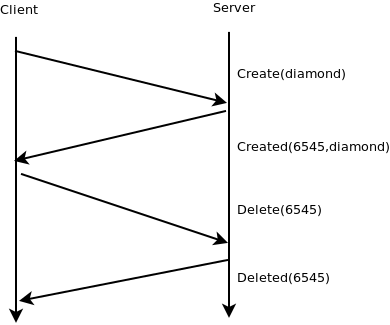
The sequence diagram below represents a scenario showing how to create a diamond and delete it.
In this example, we need to:
-
know the creation time, namely the time elapsed between the request
Create(diamond)and the responseCreated(6545,diamond) -
wait that the diamond is created before deleting it
WebSocket channel
WebSocket channel provides a way to specify the XPath or regular expression to extract the mapping ID from the WebSocket responses. The expressions will be applied on all messages received on the channel in order to extract a mapping ID. If a mapping ID matches the one of a synchronous WebSocket request, then it is considered as the response of this request. A WebSocket channel can define only one way to extract the mapping ID from the response, so the XPath or regular expression has to be generic enough to handle all responses.
For more information about WebSocket channel, see Create a WebSocket channel.
In the example of a drawing editor, the response ID extraction is configured as shown below:
Regular expression: ^Created\([^,]*,([a-z]*),\)
Value template: $1$
WebSocket request
By default, all recorded WebSocket requests are asynchronous. The request execution does not wait for any response. Since no response can be linked to this request, there is no way to get response time on this action, nor specify a variable extractor.

If the WebSocket request can be mapped to a response, then it is possible to change the mode of this request from asynchronous to synchronous. A mapping ID has to be specified. It is a string that represents the link with a future WebSocket response. The next message received on the WebSocket channel that contains the same mapping ID will be considered as the response of this request.

In the drawing editor example, the mapping ID is "diamond".
For more information about WebSocket requests, see Record a WebSocket request.
Configure messages mapping
See Configure messages mapping for more information.
In the drawing editor example, we can recognize the protocol with the regular expressions:
-
for the request:
Create\(([^,])\)and$1$as value template -
for the response:
Created\([0-9]*,([^,]*),
Post-recording wizard
At the end of the recording, a wizard asks the user to search for framework parameters. If the Use Framework rules option is enabled, NeoLoad can search for WebSocket messages mapping in the recorded requests and configure the Virtual User Profile. When XPath, JSONPath or regular expressions from a framework match the mapping identifier from a request and a response, NeoLoad brings the below modification to the Virtual User profile:
-
the mapping identifier extracted from the WebSocket request is assigned to the Mapping ID field (the request is asynchronous by default but it can be switched to synchronous manually in order to have variable extractors, validations and response times)
-
the WebSocket response becomes the response of the WebSocket request
-
the response matcher (defined by the WebSocket push framework) that has been used is assigned to the WebSocket channel. If the WebSocket channel already defines a response matcher, then new ones are ignored.
WebSocket requests that cannot be matched to a WebSocket response remain as WebSocket asynchronous requests and they don't have neither mapping ID nor response pre-filling.
All WebSocket responses remain on the WebSocket channel, even if they match a request in WebSocket round-trip message.
The Post-recording wizard can be started on demand on the Virtual User profile already recorded with the option Search for dynamic parameter on a Virtual User.
Design a VU containing WebSocket synchronous requests
-
Define the framework WebSocket messages mapping
-
Select Edit > Preferences > General settings > Frameworks.
-
Create a new framework or select an existing one.
-
In the Frameworks settings section, enable the WebSocket checkbox and click on the wrench-like button to configure it.
-
Specify the XPath or regular expression to extract the mapping ID from the WebSocket request.
-
Specify the XPath or regular expression to extract the mapping ID from the WebSocket response
-
Expressions can be tested with the Test section:
-
Click on content.
-
Paste the content of a request.
-
Check the extracted value.
-
-
-
Record a new Virtual User, at the end, the Post-Recording wizard is displayed (or manually start the Post-Recording wizard on an existing Virtual User with the right-click menu option Search for Dynamic Parameters).
-
In the Dynamic Parameters step, keep the option Use Framework rules checked.
-
In the next step of the wizard, select the framework rule you want to apply. If no framework rule has been detected for WebSocket messages mapping, check the recorded request, the recorded response, and the framework settings.
-
-
Set the WebSocket requests in synchronous mode.
-
Locate in the Virtual User tree the WebSocket requests on which you want to apply validation, variable extraction, or having response time in results.
-
Set them as synchronous mode: the request execution will be blocked until the response is received on the WebSocket channel.
-
If the request has a response but should not block the script execution, insert the WebSocket synchronous request in a fork logical action container.
-
Examples
-
Design simple framework messages mapping:
-
Select Edit > Preferences > General settings > Frameworks.
-
Create a new framework called: "SimpleDraw".
-
In the Framework settings section, enable the WebSocket checkbox and click on the wrench-like button to configure it using the following:
Request ID extraction:
Regular expression:
^Create\(([^)]*)\)Value template:
$1$Response ID extraction:
Regular expression:
^Created\([^,]*,([^)]*)\)Value template:
$1$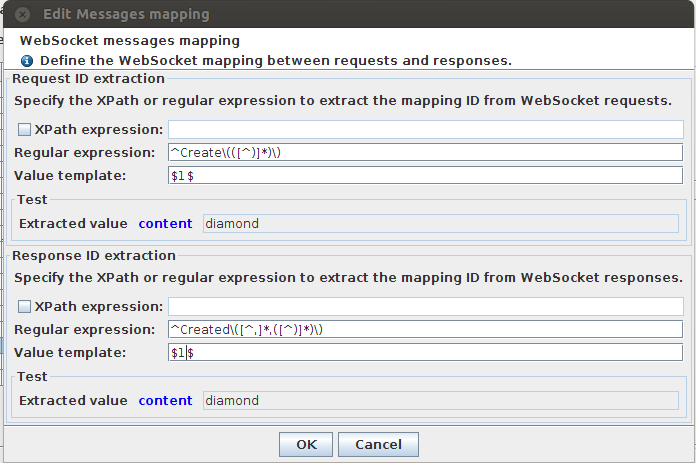
Note: you can use test field to test your regular expression. Click the content link to add a content to match.
-
-
Record a new Virtual User.
-
In the Dynamic Parameters step, keep the option Use Framework rules enabled.
-
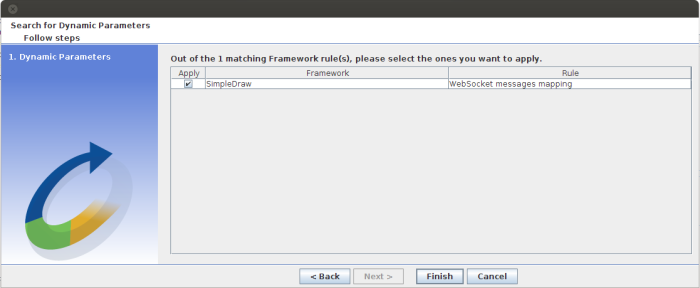
In the next step of the wizard, select the framework rule you want to apply. If no framework rule has been detected for WebSocket messages mapping, verify the recorded request, the recorded response, and the framework settings.
-
-
Set the WebSocket requests in synchronous mode.
-
Set the “websocket_request” to synchronous mode

The Mapping ID in the WebSocket request and the message mapping in the WebSocket channel are auto-filled by the ID extracted at the end of the recording thanks to the request ID extractor configured in the Framework settings.
-
-
Set the variable extractor for the delete operation.
If you try to apply a check VU on your scenario, you can see the last response is :"Oops 28262 does not exist". The identifier of the shape has changed, therefore you need to extract the new ID to replay the scenario.
-
In the Virtual User tree, go to websocket_request.
-
Click the Advanced button.
-
In the Advanced panel, select the Variable extractor tab (this tab is only displayed in synchronous mode).
-
Click the + button.
-
In the Definition tab, click the button Switch to advanced mode.
-
Enter the following text:
Variable name:
objectIdRegular expression to match:
Created\(([0-9]*),Value template:
$1$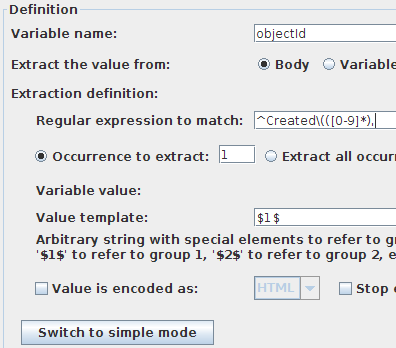
-
Go to the second websocket_request and set
Delete(${objectId})as WebSocket request. -
You can retry a Check VU and see the result.
-
Let's continue the previous example to check the response deletion.
Here we will use more permissive regular expressions to match the delete request.
Please follow the bellow steps:
-
In the Virtual User tree, go to websocket_channel.
-
Click the Advanced button.
-
In the Advanced panel, select the Messages mapping tab.
-
Change text as follows:
Regular expression:
^(Created|Deleted)\(([^,]*,)?([^)]*)\)Value template:
$3$You can test that the first message returns
diamondand the second returns a number. -
Go to the second websocket_request_1 and switch it to synchronous.
-
You can see that Mapping ID is empty. Fill it with
${objectId}. -
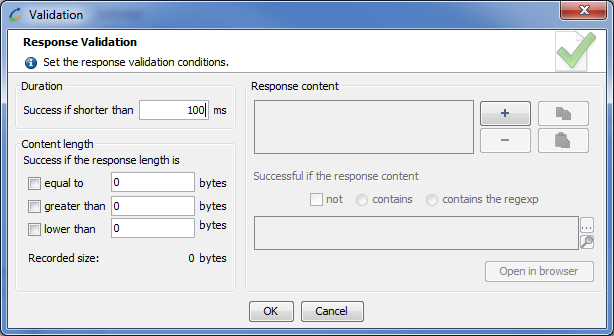
Click the Validation button and specify to be a success if the duration is shorter than 100 ms.
-
If you want, you can now delete the
end_delayaction in the Virtual User tree. -
Apply a Check VU on your scenario.
More complex frameworks:
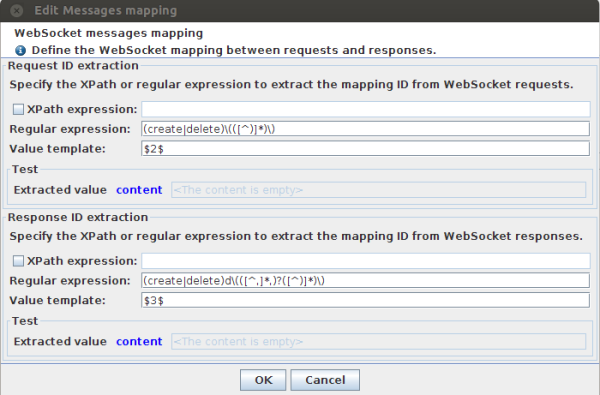
On the same idea, you can directly use a more complex framework to match create and delete requests at the same time.