Runtime overview
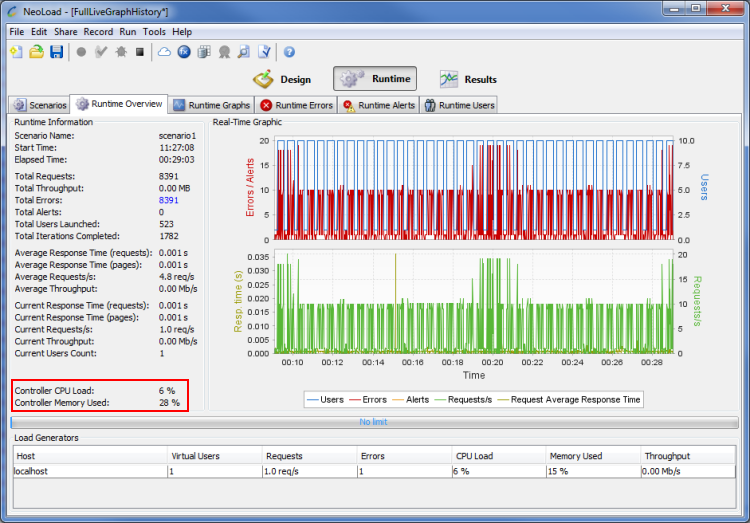
The Runtime overview tab displays the following statistics:
| Name | Description |
|---|---|
Scenario Name | Name of the scenario currently running |
Start Time | Scenario start date |
Elapsed Time | Time elapsed since test started |
Total Hits | Total number of hits since test started |
Total Throughput | Total number of megabytes received from server |
Total Errors | Total number of errors since test started |
Total Alerts | Total number of alerts since test started |
Total Users Launched | Total number of Virtual Users launched since test started, including those currently running. |
Total Iterations Completed | Total number of times when the Actions Container has been executed since test started. |
Average Response Time (requests) | Average response time for HTTP requests since test started |
Average Response Time (pages) | Average response time for web pages since test started |
Average Hits/sec. | Average hits/sec. since test started |
Average Throughput | Average throughput since test started |
Current Response Time (requests) | Average request response time for HTTP requests over the last second |
Current Response Time (pages) | Average request response time for web pages over the last second |
Current Hits/sec. | Average hits/sec. for HTTP requests over the last second |
Current Throughput | Average throughput over the last second |
Current Users Count | Number of Virtual Users currently running |
Graphs
The main statistics are plotted in real time: number of Virtual Users currently running, error rate (errors/sec.), number of alerts, hits/sec. and average request response time.
Controller
Two metrics monitor the Controller activity:
Controller CPU Load: CPU load for the machine hosting the Controller.
Controller Memory used: Memory used, expressed as a percentage of the memory allocated to the Controller program.
Load Generators
Monitors the Load Generators activity:
Host: Machine running the Load Generator.
Virtual Users: Number of Virtual Users currently being run by that Load Generator.
Hit Rate: Average hit rate generated by that Load Generator.
Errors: Current error rate (number of errors per second).
CPU Load: CPU load for the machine hosting the Load Generator.
Memory Used: Memory used, expressed as a percentage of the memory allocated to the Load Generator program (the program default memory allocation is 384Mb).
Throughput: Throughput in Megabits per second for the network interface used on the Load Generator.
If the CPU Load or Memory Used figure regularly exceeds 90%, this indicates that the Load Generator is overloaded. Run the test with fewer Virtual Users or a longer think time, or use additional Load Generators.