Run a workflow from an external program - Adder example
This example shows how to develop a simple workflow and call it from an external program. The workflow will perform an addition of two numbers specified as String parameters, storing the result in a Table dataset. The workflow will be called from a Python script using the PySimpleSoap Web Services client.
Build the Adder workflow
Create a new workspace named WebServices, and add a new workflow named Adder to the workspace. Add an Execute SQL action to the Adder workflow, and use the Define Action Parameters Wizard to add two String parameters named x and y to the action.
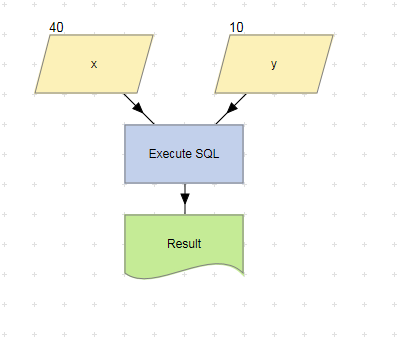
Add x, y and Result nodes to the workflow, and set numeric values for the x and y parameters. The workflow should now look like this:
Set the Execute SQL action’s Statements property to the following. Each SQL statement should be stored as a separate string entry.
CREATE TABLE Result(Answer Int)
INSERT INTO Result SELECT x + y
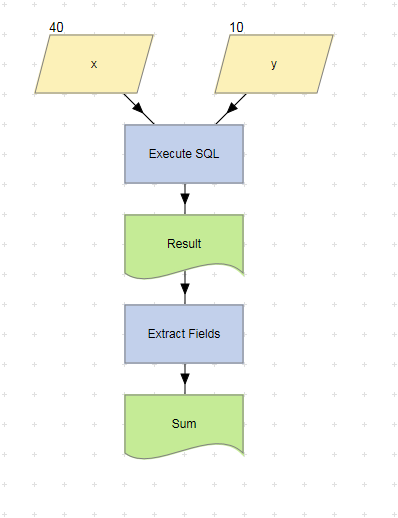
Add an Extract Fields action to the workflow. Link its Source property to the Result dataset, and add a Result1 dataset to the action. Edit the action’s Columns to Params property and set it to a table row containing the following values:
Answer, Result1
Rename the Result1 parameter node to Sum. The workflow should now look like this:
Run the workflow and verify that the Sum dataset contains the correct result.
Register the workflow as a Web Service
Use the Register Workflow as Web Service Wizard to register the Adder workflow as a Web Service. Select both x and y in the Choose Input Parameters screen, and Sum in the Choose Output Parameter screen.
Download and Install Python
Download Python 2.7.3 from the Python Programming Language Official Website at http://python.org. Run the installation program, and then set your Windows path variable to include the directory location of the PYTHON.EXE executable.
Verify the installation by entering python in a command window.
C:\>python
Python
2.7 (r27:82525, Jul
Type "help", "copyright", "credits" or "license" for more information.
>>>
Download and install the PySimpleSoap web services client
Download the PySimpleSoap 1.0.5 source package from http://code.google.com/p/pysimplesoap/downloads/list and extract the ZIP file to a temporary directory. To resolve a ‘timeout isn't supported’ error that may occur when running the Web Services client, follow these steps:
- Edit the <Download dir>\ pysimplesoap-1.05a\pysimplesoap\client.py file.
- Change the line that reads:
TIMEOUT = 60
to
TIMEOUT = None
- Save the client.py file.
Install the PySimpleSoap web services client from a command window by running the following from the <Download dir>\pysimplesoap-1.05a directory:
python setup.py install
Create the Python script
Create a new file named Adder.py. Paste in the following code and save the file.
# Adder.py
# Python LiveCompare web services client.
# Import the web services client.
from pysimplesoap.client import SoapClient
# Import date and time functions.
import datetime
# Import a 'sleep' function.
import time
# Workflow status strings.
COMPLETED = 'COMPLETED'
RUNNING = 'RUNNING'
QUEUED = 'QUEUED'
FAILED = 'FAILED'
UNRECOGNIZED_TOKEN = 'UNRECOGNIZED_TOKEN'
# Set WSDL to the link to your Web Service, obtained from the Web Services screen.
WSDL = 'http://localhost/livecompare/WebServices/Adder.lcsx?WSDL'
TRACE = False
# Set the web services client.
client = SoapClient(wsdl=WSDL, trace=TRACE)
# Start the workflow, passing in the input parameter values.
# swr stores the StartWorkflow() result.
swr = client.StartWorkflow(x='80', y='20')
status = ''
# Obtain the workflow token.
token = swr['StartWorkflowResult']['token']
# Obtain the recommended polling interval.
interval = swr['StartWorkflowResult']['interval']
# Obtain the EndWorkflow() result in order to check the workflow status.
ewr = client.EndWorkflow(token=token)
# Repeat until a break is reached.
while True:
# Print the date and time, and the current workflow status.
status = ewr['EndWorkflowResult']['status']
print datetime.datetime.today(), status
if status == FAILED:
break
# Workflow started but an error occurred while it was running.
if status == COMPLETED:
break
# Workflow ran to completion.
if status == UNRECOGNIZED_TOKEN:
break
# Invalid workflow token.
# Sleep for the recommended polling interval.
time.sleep(interval)
# Obtain the EndWorkflow() result.
ewr = client.EndWorkflow(token=token)
# If the status is 'COMPLETED' print out the workflow result.
if status == COMPLETED:
print datetime.datetime.today(), ewr['EndWorkflowResult']['workflowResult']
Test the script
To test the script, run the following from a command window:
python Adder.py
Verify the script results.
C:\temp>python Adder.py
2012-09-17 10:58:48.586000 RUNNING
2012-09-17 10:58:50.658000 COMPLETED
2012-09-17 10:58:50.661000 {'Sum': u'100'}