Guided Configuration - Test RFC Destinations
RFC Destinations allow LiveCompare to connect to SAP systems. Administrators can test an RFC Destination in the Guided Configuration - RFC Destinations screen to check that it will work as expected when used in apps and workflows, or to download data from SAP.Guided Configuration - RFC Destinations screen The test checks the following:
-
That LiveCompare can access the RFC Destination’s SAP system.
-
That the SAP system includes the correct LiveCompare core and optional transports.
-
That the SAP user account associated with the RFC Destination has the correct authorizations.
-
Whether the SAP system is Unicode or non-Unicode. LiveCompare adjusts its definition for the RFC Destination if required.
To test an RFC Destination, do the following:
-
Select the RFC Destination’s
 icon in the last column of the RFC Destinations table. LiveCompare displays the Test Connection screen. If a user has tested the connection earlier, the screen shows the time and date of the last test, and the account name of the user who performed it. The screen also shows the latest test results.
 -
Select Test to test the RFC Destination connection. If the test is successful, the Test Connection screen looks like this:
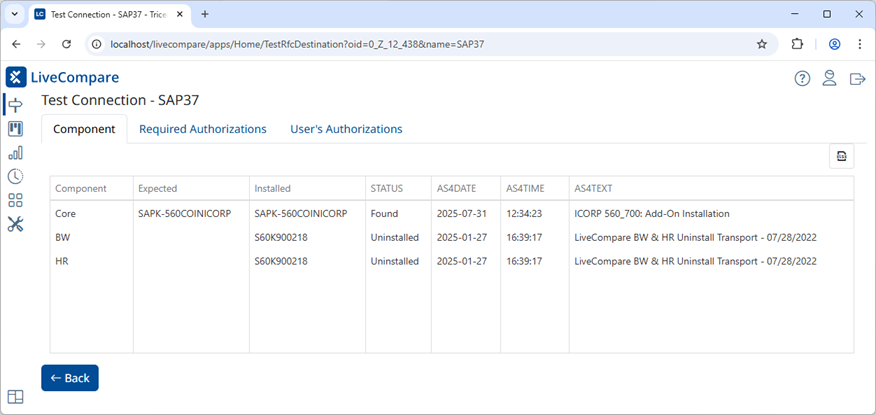
This screen has the following tabs:
Component
This tab lists the RFC Destination’s installed SAP components.
| Field | Description |
|---|---|
| Component | The SAP component tested. Either Core, BW or HR. |
| Expected | The expected SAP Add-on or transport name. |
| Installed | The installed transport name. |
| STATUS |
The component’s status. One of the following:
|
| AS4DATE | The installed transport’s modification date. |
| AS4TIME | The installed transport’s modification time. |
| AS4TEXT | The installed transport’s description. |
Required Authorizations
This tab lists the authorizations required for the SAP user account associated with the RFC Destination.
| Field | Description |
|---|---|
| RFC | The name of the RFC Destination. |
| OBJCT | The name of the SAP authorization object. |
| FIELD | The authorization object's field name. |
| VON | The start of the authorization object's value range. |
| STATUS | The authorization object’s status. Review this column for values other than Found. Note that not all the listed authorizations may be required. For example, BW authorizations aren’t required on non-BW systems. |
User’s Authorizations
This tab lists the authorizations assigned to the SAP user account associated with the tested RFC Destination.
| Field | Description |
|---|---|
| RFC | The name of the RFC Destination. |
| OBJCT | The name of the SAP authorization object. |
| FIELD | The authorization object's field name. |
| VON | The start of the authorization object's value range. |
If the connection test fails, the Test Connection screen displays the error message returned from SAP.
Click Back to return to the Guided Configuration screen's RFC Destinations tab.