Convert Data actions
Convert Data actions take the data stored in one or more input parameters or datasets, and convert it to data stored in one or more output datasets.
| Action property | Description |
|---|---|
| Convert Type | A String parameter or dataset specifying the conversion type. This is only used for some types of conversion. |
| In<Type>, String1 - String9 | A <Type> or String parameter or dataset that provides the data to be converted. |
| Out<Type> | A <Type> dataset that stores the converted data. |
| XSL | XML code defining an XSL transformation for input XML parameters or datasets (optional). |
The following matrix shows the data types you can convert. Each Convert Data action node may only be used for a single type of conversion:
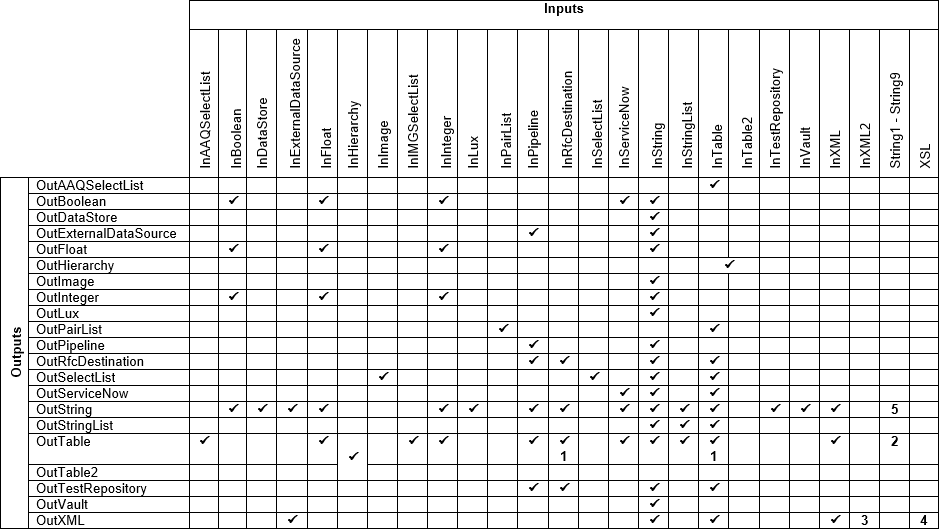
1
Used when you set the Convert Type property to TableKey_Table.
2
Used when you set the Convert Type property to StringsToTwoColumnTable.
3
Used when you set the Convert Type property to CombineXMLs.
4
Optional. XML code defining an XSL transformation.
5
Used when you set the Convert Type property to JoinStrings.
Convert AAQ Select Lists to Tables
You can convert an AAQ Select List to a Table by specifying the Convert Data action’s InAAQSelectList and OutTable properties. In this type of conversion, the output table that stores the AAQ Select List has an ID column which stores rule names, and a CATEGORY_ID column which stores category names.
Convert BSP Applications to performance history data
If you set the Convert Data action’s Convert Type property to WebToWAPA, the action converts a table of BSP Application ENTRY_IDs retrieved by the SWNC_COLLECTOR_GET_AGGREGATES function to a table of WAPA application statistics that may provide usage data for other actions.
Each WAPA name is retrieved from the O2APPL table’s APPNAME field on the specified RFC Destination.
For this conversion, specify the InRfcDestination, InTable and OutTable properties. The input table should have a NAME column which stores BSP Application ENTRY_IDs, and a COUNT column which stores their usage counts. The output table has the following columns:
| Column | Description |
|---|---|
| TYPE | This column has the value WAPA. |
| NAME | The retrieved WAPA name. |
| ACCOUNT | This column is empty. |
| COUNT | The COUNT value from the input table. |
| SOURCE_NAME | The NAME column from the input table. |
Convert Floats to Tables
You can convert a Float to a Table by specifying the Convert Data action’s InFloat and OutTable properties. In this type of conversion, the output table that stores the Float has a single FLOAT column.
Convert Hierarchy Datasets to Tables
You can convert a Hierarchy dataset to two output tables. For this conversion, specify the Convert Data action’s InHierarchy, OutTable and OutTable2 properties.
The OutTable dataset stores objects from the hierarchy, and has the following columns:
| Column | Description |
|---|---|
| ~ | This column has the value =. |
| System | The action doesn’t use this column. |
| ID | The internal identifier for the hierarchy object. |
| STATUS | The internal identifier for the object’s comparison status. |
| ROLLUP_STATUS | For objects with subobjects, this column stores the internal identifier for the object’s rolled-up comparison status. |
| TYPE | The type of the object. |
| NAME | The name of the object. |
| DESCRIPTION | The object’s description. |
The STATUS and ROLLUP_STATUS columns may contain the following values:
| status | Description |
|---|---|
| 0 | The object was not compared. |
| 2 | The object exists in the first compared system only. |
| 3 | The object exists in the second compared system only. |
| 4 | The object is the same in each compared system. |
| 5 | The object is different in each compared system. |
| 6 | The object couldn't be compared. |
Convert Images to Strings
If you set the Convert Data action’s Convert Type property is to Image_String, the action converts an Image parameter or dataset to a String dataset. For this conversion, specify the Convert Data action’s InImage and OutString properties.
Convert IMG Select Lists to Tables
You can convert an IMG Select List to a Table by specifying the Convert Data action’s InIMGSelectList and OutTable properties. In this type of conversion, the output table that stores the IMG Select List has CLASS and OBJECT columns.
Convert Integers to Tables
You can convert an Integer to a Table by specifying the Convert Data action’s InInteger and OutTable properties. In this type of conversion, the output table that stores the Integer has a single INTEGER column.
Convert LiveCompare names to SAP names
If you set the Convert Data action’s Convert Type property to LCNameToSAPName the action converts a compound object name without padding:
| TYPE | NAME |
|---|---|
| DYNP | SAPLZUTL 0100 |
… to a compound object name with padding.
| TYPE | NAME |
|---|---|
| DYNP | SAPLZUTL 0100 |
The Uses What action returns compound object names without padding in its Tree dataset, however the Get SAP Objects action requires padded compound object types in its Objects dataset.
For this type of conversion, the InTable and OutTable properties should be specified, and the input table should include TYPE and NAME columns.
Convert Pipelines to Analysis Systems
If you set the Convert Data action’s Convert Type property to PipelineToAnalysisSystem, the action converts a Pipeline parameter or dataset to an RFC Destination dataset containing the Pipeline’s Analysis System. For this conversion, specify the Convert Data action’s InPipeline and OutRFCDestination properties.
Convert Pipelines to Comparison Systems
If you set the Convert Data action’s Convert Type property to PipelineToComparisonSystem, the action converts a Pipeline parameter or dataset to an RFC Destination dataset containing the Pipeline’s Comparison System. For this conversion, specify the Convert Data action’s InPipeline and OutRFCDestination properties.
Convert Pipelines to Usage Systems
If you set the Convert Data action’s Convert Type property to PipelineToUsageSystem, the action converts a Pipeline parameter or dataset to an RFC Destination dataset containing the Pipeline’s Usage System. For this conversion, specify the Convert Data action’s InPipeline and OutRFCDestination properties.
Convert Pipelines to Business Critical Objects External Data Sources
If you set the Convert Data action’s Convert Type property to PipelineToBusinessCritical, the action converts a Pipeline parameter or dataset to an External Data Source dataset containing the Pipeline’s Business Critical Objects External Data Source. For this conversion, specify the Convert Data action’s InPipeline and OutExternalDataSource properties.
Convert Pipelines to SAP Solution Manager Systems
If you set the Convert Data action’s Convert Type property to PipelineToSolutionManagerSystem, the action converts a Pipeline parameter or dataset to an RFC Destination dataset containing the Pipeline’s SAP Solution Manager System. For this conversion, specify the Convert Data action’s InPipeline and OutRFCDestination properties.
Convert Pipelines to Most-at-risk Search Test Repositories
If you set the Convert Data action’s Convert Type property to PipelineToSearchTestRepos the action converts a Pipeline parameter or dataset to a Table dataset containing the Pipeline’s distinct Most-at-risk Search Test Repositories. For this conversion, specify the Convert Data action’s InPipeline and OutTable properties.
Convert Pipelines to Most-at-risk Gaps Test Repositories
If you set the Convert Data action’s Convert Type property to PipelineToGapsTestRepo, the action converts a Pipeline parameter or dataset to a Test Repository dataset containing the Pipeline’s Most-at-risk Gaps Test Repository. For this conversion, specify the Convert Data action’s InPipeline and OutTestRepository properties.
Convert Pipelines to Most-at-risk Hits Execution Test Repositories
If you set the Convert Data action’s Convert Type property to PipelineToExecuteTestRepos, the action converts a Pipeline parameter or dataset to a Table dataset containing the Pipeline’s distinct Most-at-risk Hits Execution Test Repositories. For this conversion, specify the Convert Data action’s InPipeline and OutTable properties.
Convert Pipelines to Tosca Most-at-risk Search Test Repositories
If you set the Convert Data action’s Convert Type property to PipelineToToscaRepo the action converts a Pipeline parameter or dataset to a Test Repository dataset containing the Pipeline’s first Tosca Most-at-risk Search Test Repository. For this conversion, specify the Convert Data action’s InPipeline and OutTestRepository properties.
Convert Pipeline to Execution Names
If you set the Convert Data action’s Convert Type property to PipelineToExecuteName, the action converts a Pipeline parameter or dataset to a Table dataset containing the Pipeline’s distinct Execution Names. For this conversion, specify the Convert Data action’s InPipeline and OutTable properties.
Convert Pipelines to Execution Paths
If you set the Convert Data action’s Convert Type property to Pipeline_ExecutePath, the action converts a Pipeline parameter or dataset to a Table dataset containing the Pipeline’s distinct Most-at-risk Hits Execution Test Repository Execution Paths. For this conversion, specify the Convert Data action’s InPipeline and OutTable properties.
Convert Pipelines to Execution List Paths
If you set the Convert Data action’s Convert Type property to Pipeline_ExecuteListPath, the action converts a Pipeline parameter or dataset to a Table dataset containing the Pipeline’s Most-at-risk Hits Execution Test Repository Execution List Paths. For this conversion, specify the Convert Data action’s InPipeline and OutTable properties.
Convert Pipelines to Known Test Gaps External Data Sources
If you set the Convert Data action’s Convert Type property to PipelineToKnownTestGaps, the action converts a Pipeline parameter or dataset to an External Data Source dataset containing the Pipeline’s Known Test Gaps External Data Source. For this conversion, specify the Convert Data action’s InPipeline and OutExternalDataSource properties.
Convert Pipelines to Strings
You can convert a Pipeline to a String by specifying the Convert Data action’s InPipeline and OutString properties.
Convert RFC Destinations to Strings
You can convert an RFC Destination to a String by specifying the Convert Data action’s InRfcDestination and OutString properties.
Convert ServiceNows to Strings
You can convert a ServiceNow to a String by specifying the Convert Data action’s InServiceNow and OutString properties.
Convert RFC Destinations to Tables
You can convert an RFC Destination to a Table by specifying the Convert Data action’s InRfcDestination and OutTable properties. In this type of conversion, the output table has the following columns:
| Column | Description |
|---|---|
| NAME | The name of the RFC Destination. |
| TYPE | The type of the SAP server used for the connection. This column has the value A if the connection uses an Application Server, or M if the connection uses a Message Server. |
| SYSID | The SAP system ID used for the connection. |
| ASHOST | The DNS name, domain name or IP address of the SAP Application Server or Message Server. |
| GROUP | For Message Servers, this field stores the name of the logon group. |
| INSTANCENR | The application instance number of the SAP system. |
| USER | The SAP user ID used for this connection. |
| CLIENT | The SAP client. |
| LANGUAGE | The SAP logon language. |
Convert SAP names to LiveCompare names
If you set the Convert Data action’s Convert Type property to SAPNameToLCName the action converts a compound object name with padding:
| TYPE | NAME |
|---|---|
| DYNP | SAPLZUTL 0100 |
… to a compound object name without padding.
| TYPE | NAME |
|---|---|
| DYNP | SAPLZUTL 0100 |
For this type of conversion, the InTable and OutTable properties should be specified, and the input table should include TYPE and NAME columns.
Convert ServiceNows to Tables
You can convert a ServiceNow to a Table by specifying the Convert Data action’s InInteger and OutServiceNow properties. In this type of conversion, the output table that stores the Integer has a single NAME column.
Convert Strings to Images
If you set the Convert Data action’s Convert Type property to String_Image, the action converts a String parameter or dataset to an Image dataset. For this conversion, specify the Convert Data action’s InString and OutImage properties.
Convert Strings to Pipelines
You can convert a String to a Pipeline by specifying the Convert Data action’s InString and OutPipeline properties.
Convert Strings to RFC Destinations
You can convert a String to an RFC Destination by specifying the Convert Data action’s InString and OutRfcDestination properties.
Convert Strings to ServiceNows
You can convert a String to a ServiceNow by specifying the Convert Data action’s InString and OutServiceNow properties.
Convert Strings to String Lists
You can convert a String to a String List, for example so that it can be used as the To property for a Send Email action. For this conversion, specify the Convert Data action’s InString and OutStringList properties.
Convert Strings to Tables
You can convert a String to a Table by specifying the Convert Data action’s InString and OutTable properties. In this type of conversion, the output table that stores the String has a single NAME column.
Convert Strings to Test Repositories
You can convert a String to a Test Repository by specifying the Convert Data action’s InString and OutTestRepository properties.
Convert Strings to two-column Tables
If you set the Convert Data action’s Convert Type property to StringsToTwoColumnTable, the action converts a String parameter or dataset to a Table dataset with NAME and VALUE columns. The NAME column stores the name of the String parameter or dataset, and the VALUE column stores its value.
For this type of conversion, one or more of the String1 - String9 properties should be specified as inputs, and the OutTable property should be specified as an output. You can use the output table as the Create Dashboard Report action’s Additional Resources dataset.
Concatenate Strings
If you set the Convert Data action’s Convert Type property to JoinStrings, the action concatenates the values stored in its String1 to String<n> properties in 1 to n order, and stores its result in a String dataset. For this type of conversion, two or more String<n> properties should be specified, as well as the OutString property.
-
Empty String<n> parameters and datasets are included in the concatenation.
-
Empty literal String<n> properties aren’t included in the concatenation.
-
If the Convert Data action’s Separator property is specified, the separator string (which can be of any length) is included between each of the strings.
Convert String Lists to Strings
You can convert a String List to a String by specifying the Convert Data action’s InStringList and OutString properties. The String value stores the first item in the String List.
Convert String Lists to Tables
You can convert a String List to a Table by specifying the Convert Data action’s InStringList and OutTable properties. In this type of conversion, the output table that stores the String List has a single NAME column.
Convert Table Keys to selection tables
If you set the Convert Data action’s Convert Type property to TableKey_Table, the action converts a table containing table keys to a table of field selections for the corresponding tables. For this conversion, specify the InTable, OutTable and InRfcDestination properties.
The input table should have at least a NAME column that contains table key data. For example, the NAME column returned by the Get SAP Objects action for objects with type TABK. The InRfcDestination property should refer to the RFC Destination from which to obtain table key data. The OutTable dataset has the following columns:
| Column | Description |
|---|---|
| TABLE | The name of the SAP table containing the table key. |
| FIELD | A key field from the SAP table. |
| OP | This column has the value EQ (equals). |
| LO | The field value associated with the table key. |
| HI | This column isn't set. |
| IE | This column has the value I (include). |
You can use it as the Rows to Read property for the Retrieve Table Set action. See the Select List parameters help topic for further details.
Convert Tables to AAQ Select Lists
You can convert a Table to an AAQ Select list, for example so it can be used as the AAQ Select List property for the Analyze ABAP Quality action. For this conversion, specify the InTable and OutAAQSelectList properties. The input table should include an id column which stores rule names, and a categoryId column which stores category names.
Convert Tables to Booleans
You can convert a Table to the Boolean value true if it contains any rows, or to the Boolean value false if it is empty. For this type of conversion, the Convert Data action’s InTable and OutBoolean properties should be specified, and the Convert Type property should be set to Table_Boolean.
Convert Tables to Hierarchy Datasets
You can convert two input Tables to a Hierarchy dataset by specifying the Convert Data action’s InTable, InTable2 and OutHierarchy properties. The two input tables should be those generated by the Hierarchy Datasets to Tables conversion type described above (modified if necessary to support your own workflow requirements).
Convert Tables to Pair Lists
You can convert a Table to a Pair List, for example so that it can be used as the Key Map property for the Read SAP Table and Join action. For this conversion, specify the Convert Data action’s InTable and OutPairList. Rows from the first two columns in the table are converted to items in the Pair List.
Convert Tables to RFC Destinations
You can convert a Table to an RFC Destination by specifying the Convert Data action’s InTable and OutRfcDestination properties. The action considers the first table row only, and converts the value stored in the Name column to an RFC Destination. RFC Destination names are case-insensitive. If LiveCompare is Resource Group-controlled, you should make sure that the RFC Destination is available in your current Resource Group.
You can use this type of conversion in conjunction with the Get Administration Objects action, specifying RfcDestination as the value of the action’s Object Type parameter.
Convert Tables to Select Lists
You can convert a Table to a Select List, for example so that it can be used as the Selects property for a Get SAP Objects action. For this conversion, specify the Convert Data action’s InTable and OutSelectList properties. The input table should have at least the following columns:
| Column | Description |
|---|---|
| FIELD | An SAP object type or table field name. |
| OP | The comparison operator to use: One of EQ, GT, GE, LT, LE, BT or CP. |
| LO | The low comparison value. |
| HI | If the BT operator is used, this field refers to the high comparison value. |
| IE | Enter I to include objects or table rows that match this specification, or E to exclude them. |
See the Select List parameters help topic for further details.
Convert Tables to ServiceNows
You can convert a Table to a ServiceNow by specifying the Convert Data action’s InTable and OutServiceNow properties. The action considers the first table row only, and converts the value stored in the Name column to a ServiceNow. ServiceNow names are case-insensitive. If LiveCompare is Resource Group-controlled, you should make sure that the ServiceNow is available in your current Resource Group.
You can use this type of conversion in conjunction with the Get Administration Objects action, specifying ServiceNow as the value of the action’s Object Type parameter.
Convert Tables to Strings
If you set the Convert Data action’s Convert Type property to TableToHtmlString, the action converts a Table to its HTML representation stored as a String. For this conversion, specify the InTable and OutString properties. To prevent converting a large amount of data, the action will report an error if there are more than 30 columns in the input table, or more than 8,192 characters in the resulting HTML string.
You can substitute the String dataset returned by this type of conversion into the Send Email action’s Message parameter. This allows you to include the contents of a Tableparameter or dataset in an email.
If the Convert Type property isn't specified, the action converts the first cell in the input table to a string. The string value is returned in the action’s OutString dataset.
Convert Tables to String Lists
You can convert a Table to a String List by specifying the Convert Data action’s InTable and OutStringList properties. The String List stores values from the first column in the input table.
Convert Tables to Test Repositories
If you set the Convert Data action’s Convert Type property to Table_TestRepository, the action converts the first column of the first row of a table to a Test Repository. For this conversion, specify the InTable and OutTestRepository properties.
Convert Tables to XML datasets
If you set the Convert Data action’s Convert Type property to TableToXML, the action converts a table to its XML representation. For this conversion, specify the InTable and OutXML properties. In the resulting XML, the Name node is named after the parameter or dataset used in the conversion.
Convert Test Repositories to Strings
You can convert a Test Repository to a String by specifying the Convert Data action’s InTestRepository and OutString properties.
Convert XML External Data Sources to XML datasets
You can convert an XML External Data Source dataset to an XML dataset by specifying the InExternalDataSource and OutXML properties.
XML conversions
The Convert Data action supports the following conversions for XML data types:
- If the InString and OutXML properties are set, the input string is parsed as XML and stored in the output dataset.
- If the InXML property is set, you can convert the input XML to a table, a string or XML by specifying the OutTable, OutString or OutXML properties. You can set one or more of these output properties.
- The XSL property stores an XML parameter or dataset specifying an XSL transformation. If this property is set, the XSL transformation is applied to the InXML parameter or dataset before the conversion is performed.
Obtain field definitions from a Table
If you set the Convert Data action’s Convert Type property to Table_TableDefinition, the action obtains the field definitions from an input Table parameter or dataset. For this conversion, specify the InTable and OutTable properties.
The OutTable dataset has the following columns:
| Column | Description |
|---|---|
| TABLE | For SAP tables, this column stores the name of the table. For tables that have not been read from an SAP system, this column is left blank. |
| NAME | The name of a field from the table. |
| TYPE | The type of the field. |
| LENGTH | The length of the field. |
| ISKEY | This column has the value true if the field from the input table is a key field, and false if it isn’t a key field. |
Convert a Table definition to a Table
If you set the Convert Data action’s Convert Type property to TableDefinition_Table, the action converts a table of field definitions to an empty table with the specified columns. For this conversion, specify the InTable and OutTable properties.
The InTable parameter or dataset should have the following columns:
| Column | Description |
|---|---|
| TABLE | The action doesn’t use this column. |
| NAME | The name of the field. |
| TYPE | The type of the field: nvarchar, int, or float. |
| LENGTH | The length of the field. Use 255 for nvarchar fields, 4 for int fields, and 8 for float fields. |
| ISKEY | Set this column to true to create a key field, or false to create a non-key field. |
Remove status details from the results of the Compare Tables action
If you set the Convert Data action’s Convert Type property to ConvertStatus, the action converts a table with status information returned by the Compare Tables action to a table with NAME, TYPE and Status columns. For this conversion, specify the InTable and OutTable properties.
Combine XMLs Convert Type
If you set the Convert Data action’s Convert Type property to CombineXMLs, the action combines two or more XML parameters or datasets to a single XML dataset, using the specified string value as a top-level XML tag. For this conversion, specify the InXML, InXML2, InString and OutXML properties. The combined XML is stored in the OutXML dataset.
ObjectListToSelectList Convert Type
If you set the Convert Data action’s Convert Type property to ObjectListToSelectList, the action converts a table of objects to a table of object selections. For this conversion, specify the InTable and OutTable properties.
The input table should have at least a NAME and a TYPE column, for example:
| NAME | TYPE |
|---|---|
| VA01 | TCOD |
The Convert Data action converts it an output table with the following columns:
- TABNAME
- SELNAME
- KIND
- SIGN
- OPTION
- LOW
- HIGH
For example:
| TABNAME | SELNAME | KIND | SIGN | OPTION | LOW | HIGH |
|---|---|---|---|---|---|---|
| TCOD | S | I | EQ | VA01 |
You can use the OutTable dataset returned for this type of conversion as the input for Tricentis-supplied SAP functions called from LiveCompare using the Generic RFC Call action.
Implicit conversion types
LiveCompare attempts to determine the type of conversion to be performed by examining the action’s input parameters and output datasets. If the Convert Type property isn't set, LiveCompare uses its determined conversion type. If the Convert Type property and the determined conversion type are different, LiveCompare uses the Convert Type property.
Convert Data actions support the use of the Define Action Parameters Wizard, which allows new input parameters to be created with type Xml.
Example
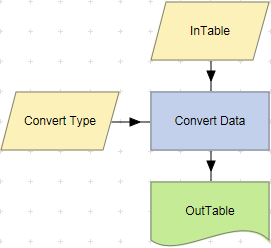
To examine the details for a Convert Data action, double-click the action node, or select View Details from the node’s context menu. If the action uses input or output tables, the Details screen displays the number of rows in the tables and the time taken for the action to complete.